Avoid Phishing
Kali365
Phishing refers to a practice scammers use. They send intended victims something to entice, (or worry enough about), that they will follow a link or call a supplied phone number. They cast the misinformation out to sometimes thousands of people, hoping to hook a few "suckers" -- hence the term "Phishing".
From there, they try to pry information from you that can help them steal from you. Your passwords, credit card numbers, etc..
A perfect example of this is the currently-popular Kali365 scam.
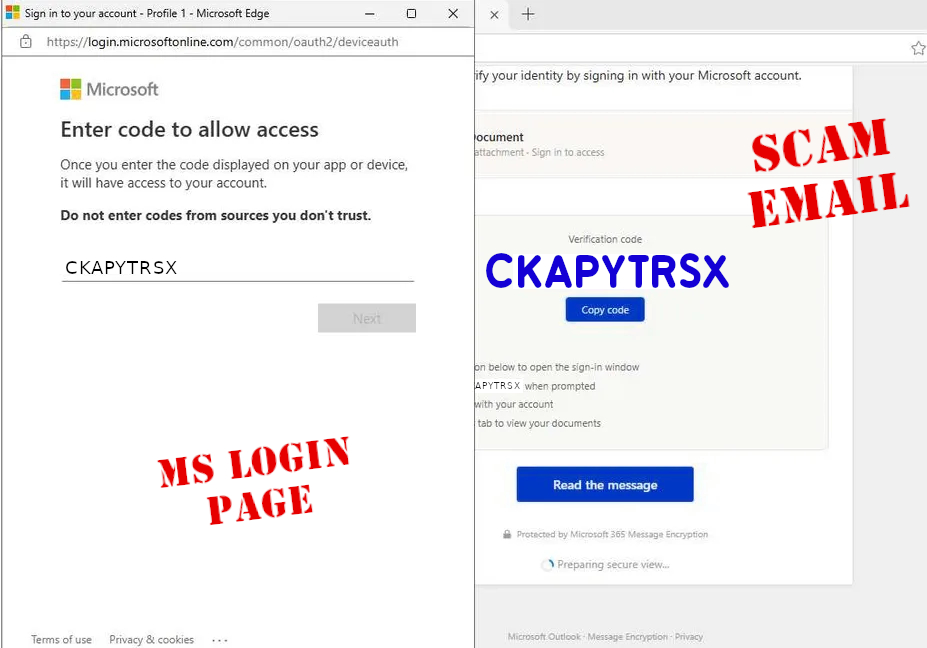
This one specifically attacks Microsoft accounts, started by sending the intended victim an email. To work, the email looks like a SharePoint document, a DocuSign request, Adobe Acrobat Sign, MS OneDrive, Teams or a Microsoft security notice. It tells you that you have a document or that some other information is available to you, and it gives you a CODE to enter into the Micrfosoft verification page so you can access it.
- The Microsoft page is legitimate.
- The number they give you is a legitimate number to enter into the Microsoft page.
- The catch is that when you enter it, you are not getting access to any information/document they promised -- you are giving access to your account for THEIR device.
They then get into your Microsoft Account without even needing a password, via an access token, and they also recieve a longer-lived refresh token. With that they can continue to access your 365 account, for weeks, even if you change your password!
What does it look like? Below I show part of an email on the right, and the subsequent microsoft verification page that pops up if you clicked on the link.
How to Spot a Fake
- Microsoft will NEVER email you a device code and ask you to enter it just to view a document.
- If you did not start a sign-in or device-pairing process yourself, do not enter a code.
- Try to verify where email was really sent from... don't rely on just what is displayed on the email.
- Look for common signs of spoofing -- like misspellings, a generic greeting instead of your name, requests for urgency...
I fell for it -- what do I do?
(Microsoft Personal Accounts)
- Navigate to the Microsoft Recent Activity Page.
- Log in with your credentials.
- Check out your sign-in history -- including geographic location, device, and web browser.
-
Terminate all active sessions:
(This will make sure other devices do not have access to your account!)
- click Security on the left menu
- select Advanced security options
- under Sign out everywhere, click Sign out
- Sign back in and change your Microsoft Account Password
- Look for changes to your email settings, like odd forwarding, hidden rules...
- File a Cybercrime report -- report the phishing incident directly to the FBI's Internet Crime Complaint Center. Provide specific details like the email headers, suspicious login times, and unauthorized devices.
- Report the Fraud to the Federal Government. Submit a detailed consumer complaint on the ReportFraud.ftc.gov website. This helps build cases against scammers and alerts others to current fraud trends.
You can also report it.